Forum

Yampiz Forum

Sharing let knowledge Spreaded, Reading let spirits growth, Creative let culture extended, Let us
  • 禁止廣告文
  • 知識傳播
  • 閱讀
  • 心靈成長
  • 創作
  • 文化傳承
Dictionary / PC / Linux 討論版 / Ubuntu /

Ubuntu 無法掛載NTFS磁區

New Subject
Random
Previous
Next
|
    Ubuntu 無法掛載NTFS磁區

    ???USB外接硬碟的NTFS磁區無法掛載
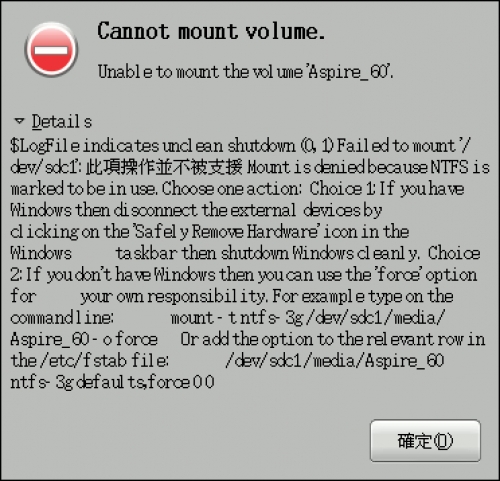
    USB外接硬碟的NTFS磁區無法掛載,要如何解決?

    現在Ubuntu已經支援 ntfs-3g 套件,可以支援對NTFS磁區的讀寫,如果你的硬碟中原來有安裝Windows系統,就能夠直接掛載讀寫原來的NTFS磁區的資料。
    安裝指令:sudo apt-get install ntfs-3g
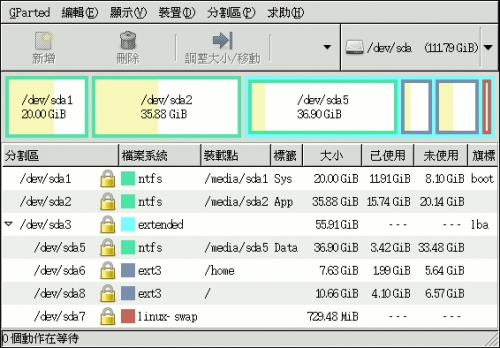
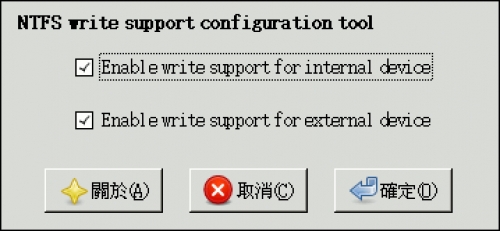
    你也可以同時安裝 ntfsconfig 這個設定輔助工具,來協助你異動想要的設定,不過通常更改的機會應該不大。
    安裝指令:sudo apt-get install ntfs-3g ntfsconfig
    但是有時外接的USB隨身硬碟內有NTFS磁區,Ubuntu可以正確偵測到卻掛載不上去,出現類似下面的訊息。
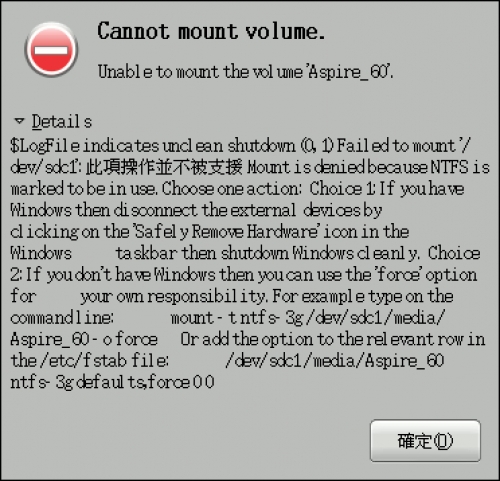

    之所以會出現 indicates unclean shutdown訊息,主要是這個外接硬碟在Windows下没有正常的卸載,也就是直接拔離USB接頭,這個時候就無法正確掛載,出現磁區不乾淨(unclean)的問題,這個時候就必須使用ntfsfix 這個工具,要使用ntfsfix工具需要先安裝ntfsprogs套件。
    安裝指令:sudo apt-get install ntfsprogs
    清除指令:sudo ntfsfix /dev/sdc1
    (sdc1這個是看你的位置,像我別台電腦就是sdb1)
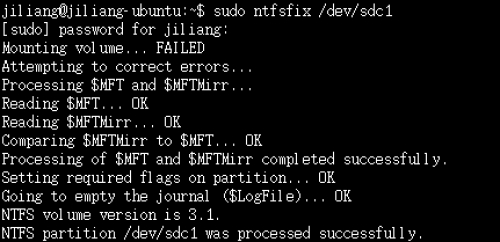
    如此就可以正確掛載USB外接硬碟的NTFS磁區,當然如果你把這顆外接硬碟又拿到Windows系統上使用,又沒有使用卸載直接拔除,下次接到Ubuntu你就得再在做一次。

    • Keywords : NTFS磁區, install, unclean, ntfsconfig, USB外接硬碟, NTFS磁區無法掛載, 設定輔助工具, 要如何解決, 要使用ntfsfix工具, 硬碟中原來, 直接掛載讀寫原來, 直接拔離USB接頭, 接到Ubuntu, 拿到Windows系統上使用, 把這顆外接硬碟, 就無法正確掛載, 就必須使用ntfsfix, 就可以正確掛載USB外接硬碟, 安裝Windows系統, 出現類似下面
    00
    2009-01-05T12:22:20+0000


    • Now, you can post comments by Facebook Account when your Yampiz account was logout or unvariable. whatever, we suggest to post comment by Yampiz Account to get more bounds to join new events of Heyxu
    Comment
     
    Verify
    Comment

    Facebook Page

    QR-Code and APP Launcher

    User Guide
    This Webpage

    In those service tabs, "Scan QRCode, in mobile device" or "Click the button, in this device" to open webpage or APP-related operations.
    QRCode
    • Auto Platform
      For better browsing experience, it will auto detects your device to display webpage.
    • Bug Report
      Tell us about the idea, problem and errors you found.
    • Comodo Secure
      The sensitive data transmission adopts by SSL-2048 authenticated encryption.
    • Copyright
      © 2009 YamPiz Digital Inc. & Jaby Group. All rights reserved.
    • Revised Version
      V2.2.552
      05 Dec 2025 (GMT+8)